
28:タグを表示
公開日:2019年07月15日
投稿はタグを複数もつことができます。カテゴリーと違いタグをもっていない投稿もあります。タグを表示させましょう。
タグ表示用関数はページ内容表示用ループ内で使用します。
タグ表示は「投稿」に設定できる機能なので「投稿一覧」と「投稿詳細」で使用します。
タグを追加
タグ作成
管理画面「投稿」>「タグ」
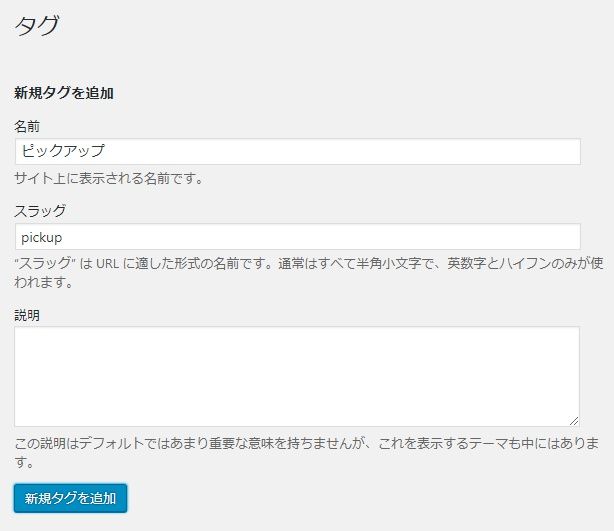
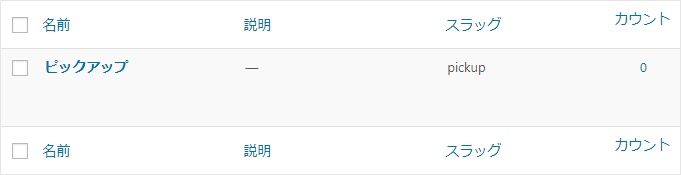
投稿カテゴリー設定
管理画面「投稿」編集画面
リンクつきタグ表示簡易版
WordPress関数にリンクつきタグ表示関数が用意されています。
<?php
if (has_tag()) {
  the_tags('<ul class="tags"><li>', '</li><li>', '</li></ul>');
}
?>
HTML出力結果
<ul class="tags">
  <li>
    <a href="http://localhost/WordPressフォルダ/tag/タグスラッグ/" rel="tag">タグ名</a>
  </li>
</ul>
リンクつきタグ表示詳細版
HTMLの構成を変えたりする場合は詳細版を使用します。
<?php // タグ文字列 ?>
<?php if (has_tag()) : ?>
  <ul class="tags">
<?php
$tagList = get_the_tags();
for ($i=0; $i < count($tagList); $i++) :
  $tagID = $tagList[$i]->term_id;
  $tagName = $tagList[$i]->name;
?>
    <li>
      <a href="<?php echo get_tag_link($tagID); ?>">
        <?php echo $tagName; ?>
      </a>
    </li>
<?php endfor; ?>
  </ul>
<?php endif; ?>
HTML出力結果
  <ul class="tags">
    <li>
      <a href="http://localhost/lesson1/tag/タグスラッグ/">
        タグ名
      </a>
    </li>
  </ul>>
投稿詳細テンプレートに追加
single.php
リンクつきカテゴリー表示簡易版コピペ用
    <div class="tag">
<?php
if (has_tag()) {
  the_tags('<ul class="tags"><li>', '</li><li>', '</li></ul>');
}
?>
    </div>
リンクつきカテゴリー表示詳細版コピペ用
<?php if (has_tag()) : ?>
    <div class="tag">
      <ul class="tags">

<?php
$tagList = get_the_tags();
for ($i=0; $i < count($tagList); $i++) :
  $tagID = $tagList[$i]->term_id;
  $tagName = $tagList[$i]->name;
?>
        <li>
          <a href="<?php echo get_tag_link($tagID); ?>">
            <?php echo $tagName; ?>
          </a>
        </li>
<?php endfor; ?>

      </ul>
    </div>
<?php endif; ?>
変更前
<?php /***** メインループ開始 *****/ ?>
<?php if (have_posts()) :?>
<?php while (have_posts()) : the_post(); ?>

    <h2 class="title"><?php the_title(); ?></h2>
    <div class="category"><?php the_category(); ?></div>
    <div class="date"><?php the_time('Y年m月d日'); ?></div>

<?php if (has_post_thumbnail()) : ?>
    <div class="eyecatch">
      <?php the_post_thumbnail('img_960_200'); ?>
    </div>
<?php endif; ?>

    <div class="article">
      <?php the_content(); ?>
    </div>

    <div class="category-org">
      <ul class="post-categories">
<?php
$category_list = get_the_category();
for ($i=0; $i < count($category_list); $i++) :
  $catID = $category_list[$i]->term_id;
  $catName = $category_list[$i]->name;
  $catSlug = $category_list[$i]->slug;
?>
        <li class="cat-<?php echo $catSlug; ?>">
          <a href="<?php echo get_category_link($catID); ?>">
            <?php echo $catName; ?>
          </a>
        </li>
<?php endfor; ?>
      </ul>
    </div>

    <div class="category-org">
      <ul class="post-categories">
<?php
$category_list = get_the_category();
for ($i=0; $i < count($category_list); $i++) :
    $catID = $category_list[$i]->term_id;
    $catName = $category_list[$i]->name;
    $catSlug = $category_list[$i]->slug;
    if($category_list[$i]->category_parent === 1) :
?>
        <li class="cat-<?php echo $catSlug; ?>">
          <a href="<?php echo get_category_link($catID); ?>">
            <?php echo $catName; ?>
          </a>
        </li>
<?php endif; ?>
<?php endfor; ?>
      </ul>
    </div>

<?php endwhile; ?>
<?php endif; ?>
<?php /***** メインループ終了 *****/ ?>
変更後
<?php /***** メインループ開始 *****/ ?>
<?php if (have_posts()) :?>
<?php while (have_posts()) : the_post(); ?>

    <h2 class="title"><?php the_title(); ?></h2>
    <div class="category"><?php the_category(); ?></div>
    <div class="tag">
<?php
if (has_tag()) {
  the_tags('<ul class="tags"><li>', '</li><li>', '</li></ul>');
}
?>
    </div>
    <div class="date"><?php the_time('Y年m月d日'); ?></div>

<?php if (has_post_thumbnail()) : ?>
    <div class="eyecatch">
      <?php the_post_thumbnail('img_960_200'); ?>
    </div>
<?php endif; ?>

    <div class="article">
      <?php the_content(); ?>
    </div>

    <div class="category-org">
      <ul class="post-categories">
<?php
$category_list = get_the_category();
for ($i=0; $i < count($category_list); $i++) :
  $catID = $category_list[$i]->term_id;
  $catName = $category_list[$i]->name;
  $catSlug = $category_list[$i]->slug;
?>
        <li class="cat-<?php echo $catSlug; ?>">
          <a href="<?php echo get_category_link($catID); ?>">
            <?php echo $catName; ?>
          </a>
        </li>
<?php endfor; ?>
      </ul>
    </div>

    <div class="category-org">
      <ul class="post-categories">
<?php
$category_list = get_the_category();
for ($i=0; $i < count($category_list); $i++) :
    $catID = $category_list[$i]->term_id;
    $catName = $category_list[$i]->name;
    $catSlug = $category_list[$i]->slug;
    if($category_list[$i]->category_parent === 1) :
?>
        <li class="cat-<?php echo $catSlug; ?>">
          <a href="<?php echo get_category_link($catID); ?>">
            <?php echo $catName; ?>
          </a>
        </li>
<?php endif; ?>
<?php endfor; ?>
      </ul>
    </div>

<?php if (has_tag()) : ?>
    <div class="tag">
      <ul class="tags">

<?php
$tagList = get_the_tags();
for ($i=0; $i < count($tagList); $i++) :
  $tagID = $tagList[$i]->term_id;
  $tagName = $tagList[$i]->name;
?>
        <li>
          <a href="<?php echo get_tag_link($tagID); ?>">
            <?php echo $tagName; ?>
          </a>
        </li>
<?php endfor; ?>

      </ul>
    </div>
<?php endif; ?>


<?php endwhile; ?>
<?php endif; ?>
<?php /***** メインループ終了 *****/ ?>
style.css
追加
.wp-content .tags {
  display: flex;
  list-style: none;
  padding: 0;
}
.wp-content .tags a {
  background-color: #333;
  border-radius: 5px;
  color: #fff;
  font-size: 12px;
  padding: 8px;
  margin-right: 10px;
}
表示結果
調べてみよう
タグ管理オブジェクトの内容を表示してみよう。
このページで出てくる関数
WordPress関数は「公式サイトのドキュメント」で確認しましょう。
WordPress関数
※欠席者対応:lesson19 – lesson20
同じカテゴリーのコンテンツ