VS Codeに「php」で「<?php ?>」を展開できるようスニペット登録
公開日:2019年11月11日
更新日:2021年10月11日
「php」+「Tab」キーで「<?php ?>」を展開できるようスニペット登録
VSCode:「ファイル」>「基本設定」>「ユーザースニペット」
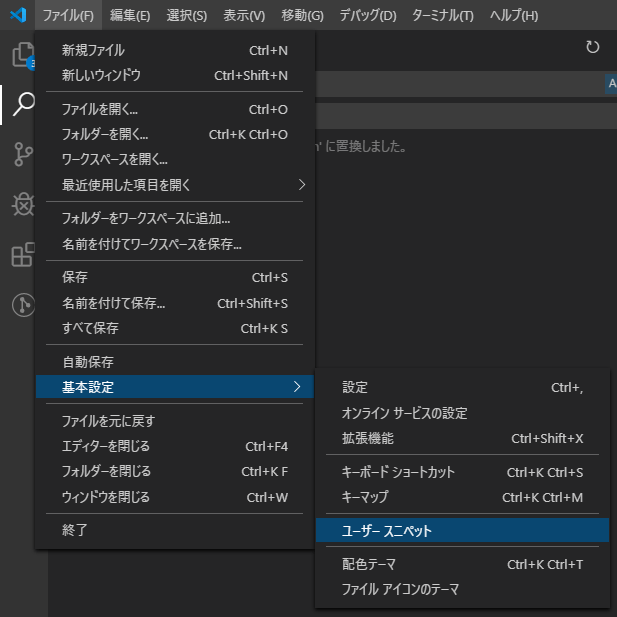
「html.json」を選択

以下をスニペットに追記
  "php": {
    "prefix": "php",
    "body": [
      "<?php $1 ?>"
    ],
    "description": "php tag"
  }
元のものに追記した結果
{
  // Place your snippets for html here. Each snippet is defined under a snippet name and has a prefix, body and
  // description. The prefix is what is used to trigger the snippet and the body will be expanded and inserted. Possible variables are:
  // $1, $2 for tab stops, $0 for the final cursor position, and ${1:label}, ${2:another} for placeholders. Placeholders with the
  // same ids are connected.
  // Example:
  // "Print to console": {
  // 	"prefix": "log",
  // 	"body": [
  // 		"console.log('$1');",
  // 		"$2"
  // 	],
  // 	"description": "Log output to console"
  // }
  "php": {
    "prefix": "php",
    "body": [
      "<?php $1 ?>"
    ],
    "description": "php tag"
  }
}
これで「php」+「Tab」キーで「<?php ?>」を展開できるようになる
同じタグのコンテンツ
同じカテゴリーのコンテンツ